The Django fork
Since Django’s test suite is designed for SQL backends, running the tests with Django MongoDB Backend requires some modifications that can’t be incorporated upstream such as:
Modifying test models to use
ObjectIdAutoFieldinstead ofAutoField.Modify URL patterns and tests that assume an integer primary key to work with an
ObjectId.Removing or modifying SQL-specific assertions.
These changes are maintained in a fork of Django. Each Django feature release has a
corresponding branch in the fork. For example, for Django 6.0, the branch is
mongodb-6.0.x.
Periodically, each branch is rebased on the upstream Django branch to pickup
the latest changes. For example, mongodb-6.0.x is rebased on Django’s
stable/6.0.x branch.
During the development of the next Django feature release, the fork’s
corresponding branch is rebased on Django’s main branch. For example,
during the development of Django X.Y, mongodb-X.Y.x is rebased on Django’s
main branch. That branch is used in the “Update to Django X.Y” pull request
to be merged upon the release of Django X.Y.
Branch relationship summary
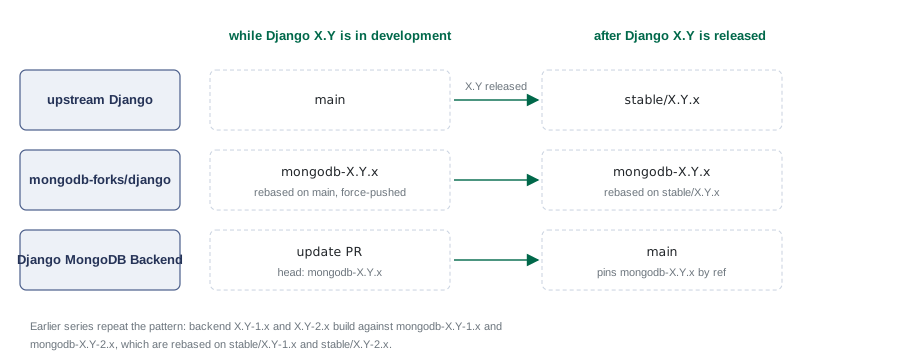
How each repository’s branches relate across a Django release cycle.
“update PR” is the open “Update to Django X.Y” pull request, e.g. “Add support for Django 6.2”.
Upstream sync automation
A scheduled workflow in the fork, upstream-sync.yml,
keeps each mongodb-X.Y.x branch current. It runs daily at 09:00 UTC. It
can also be run manually.
For each fork branch listed in the workflow’s matrix, the workflow:
Rebases the branch onto the upstream branch (
mainorstable/X.Y.x).Force-pushes the rebased branch.
Triggers the backend’s CI (see below).
A rebase that conflicts is aborted. The workflow then opens an issue in the fork for manual resolution. A rejected force-push also opens an issue.
CI trigger after a force-push
The backend pins fork branches by ref. A force-push rewrites the branch history, so the backend builds against new code, but no event tells the backend. After a successful force-push, the workflow calls the retrigger-ci action from drivers-github-tools to re-run the backend’s CI.
The workflow’s matrix maps each fork branch to a ci_rerun entry, which
selects one of these kinds:
a branch name, e.g.
mainor6.0.x— dispatch the backend’s test workflows on that branch,{"pr": N}— re-run the workflow runs of that pull request,"evergreen": true(combined with{"pr": N}) — also retry the Evergreen patch.
The mapping is kept identical to the one the local sync tooling uses, so the two cannot drift.
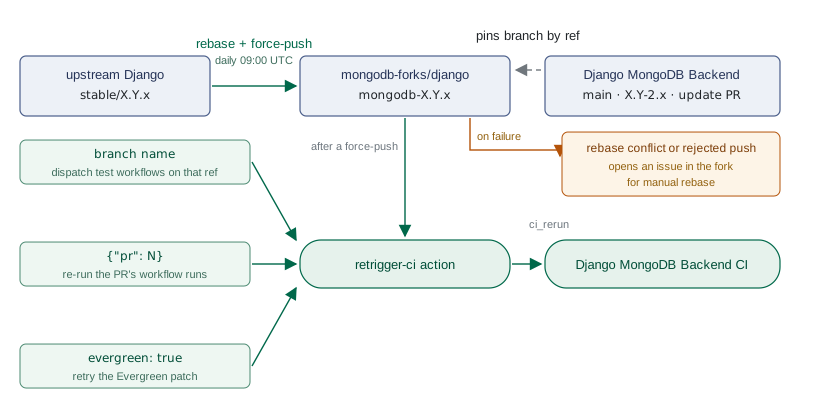
How a fork rebase re-triggers the backend’s CI.